

Hebron Savings Bank understands the importance of privacy, confidentiality, and integrity.
We have developed a framework of hardware, software, and internal controls to provide layers of protection. But in order to provide services in a secure manner, we need you! Your responsibility is to keep any access codes, passwords or PINs secure.
To assist us in offering these Web-based banking services in a secure manner, we employ a number of measures, which are described below. These measures allow us to properly authenticate your identity when you access these services and protect your information as it traverses the Internet between your PC or mobile device and Hebron Savings Bank.
Online Banking ID and Password
Every user must privately maintain a combination of an Online Banking ID and password. If you are assigned an original password by a bank administrator, the Online Banking system will force you to change it when you log in for the first time, before any transactions can be conducted. This forces each user to establish an absolutely private password. If the password is lost or forgotten, please call our Customer Care Center at (410)749-1185, and a bank administrator will reset your password for you once your identity has been confirmed. You can also click on the "Forgot Password" link, and an email to reset your password will be sent to you. In order to use this feature, however, you must have previously set up your email address and password reset question under the "Options", then "Personal" tab of online banking.
Password Lock-Out
If an unauthorized person attempts entry into an end user’s account by trying to guess a password, the system will disable the online account on the third incorrect attempt, thus invalidating the log-in combination. If you accidentally activate this security feature by unintentionally miskeying a password three times, you will need to call the Bank to reset the password for your account. A common mistake made by the end user is having the caps-lock on while keying in a password. You can also use the "Forgot Password" link to reset your password if you have previously set up that feature under the "Options", then "Personal" tab of Online Banking.
Automatic Log-off
To further protect you, a timeout feature is enabled. This feature will automatically log you out of your current online session after a 10-minute period on our site.
Browser Security
The Bank also requires the use of secure browsers to protect you while you access our Online Banking services. More specifically, the personal and account information that flows back and forth between your PC and the Bank must be encrypted while in transit – secure browsers are how we achieve this level of protection. Encryption is the process of scrambling information (typically for data transmission) so that it can only be reassembled in its original clear text format by someone who has the correct encryption key to do so. When used between you and the Bank, this technology encrypts your personal information as you send it to us, which only Hebron Savings Bank can decrypt. Likewise, when we send personal or account information to you, this technology encrypts it, which only you can decrypt. This is possible through a certified 128 bit secure server by VeriSign so that no unauthorized individuals can read or decipher the data.
How You can Protect Your Internet Security
While Hebron Savings Bank works to protect your banking privacy, you also play an important role in protecting your accounts. There are a number of steps you can take to ensure that your Hebron Savings Bank account information is protected, including:
- Keep your Online Banking password to yourself.
- Change your password frequently.
- Remain at your computer until your Online Banking transactions are completed and log out when you are finished.
- Log out of Online Banking prior to visiting other Internet sites.
- Lock your PC or mobile device with a password. This is your first line of defense against intruders.
- Avoid public Wi-Fi's when accessing your Online Banking account or other sensitive data.
- If you notice suspicious or unusual activity on your Online Banking accounts, call our Customer Care Center during regular business hours at (410)749-1185.
Special Alerts
New! Important Fraud Alert: Facebook & MetaPay Transactions
We are seeing an increase in fraudulent debit card transactions involving Facebook and MetaPay. Fraud often begins with a $0 test transaction. These may appear under merchant names such as FACEBK*X4ZHY8RT72 or METAPAY*ST4R. In most cases, customers receive a legitimate automated fraud alert from Hebron Savings Bank asking for a response as to the validity of this charge. Marking a $0 transaction as “valid” may seem harmless because it is not a negotiable amount, but this authorization could allow additional transactions from the same merchant to process, sometimes up to $1,000.
Please do not respond “valid” to any fraud alert unless you are certain you personally initiated the transaction—even if the amount is $0.
If you receive any alert that you do not recognize or are unsure about, contact our Customer Care Center at 410-749-1185 or call the number on the back of your debit card immediately.
WARNING – be cautious of fake text message alerts
Customers have reported receiving the following text alerts pretending to be from Hebron Savings Bank:
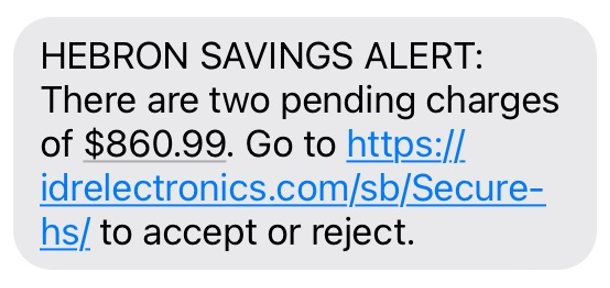
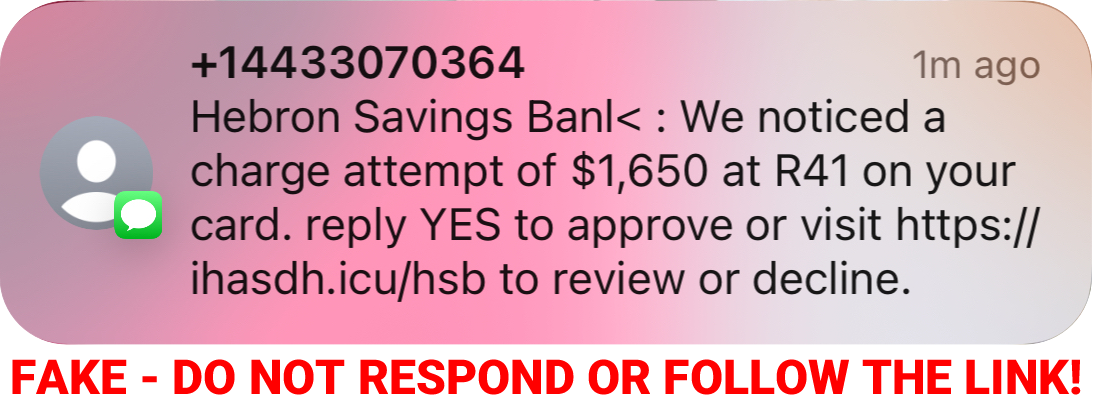
These messages are fake – please do not click on the link or respond to the message in any way. There is no pending charge. The scammers want you to click on the link in an attempt to steal your personal information and/or install malware.
IMPORTANT—Please note that the Bank does need to send fraud alerts on occasion. In a legitimate alert, you will be asked to respond to the text message with a one-letter reply. The Bank will never ask you to click on a link in a legitimate alert.
If in doubt, please do not hesitate to contact us at 410-749-1185.
WARNING – Phone scammers claiming to be from Hebron Savings Bank
The Bank has received reports that customers are receiving phone calls from individuals claiming to be from the Bank’s fraud department. The scammers are also spoofing our phone number making the caller ID look as though the call is from the Bank. The caller goes on to say there is a problem with your Online Banking account or debit card and begins to ask for account information.
THIS IS A SCAM – the Bank will never call you unexpectedly and ask for your account information or any other personal information. Under no circumstance should you ever give anyone your Online Banking ID, your Online Banking password, your full debit card account number, and/or your debit card PIN number. If you receive a call similar to this, hang up immediately and call your local branch or our Customer Care Center at 410-749-1185 to verify that there is not a problem.

Business Banking
Elevate your business with Business Banking. Explore our business solutions today!